Saturday, 28 May 2016

First attempt using Picktochart

Image result for piktochart logo
Today I trialled Piktochart. I was looking on Google+ and noticed a presentation using it so I thought I would try it out.

It was really easy to use I can see the children in my class would love to use it. One thing they would need to think about would be what content they would be displaying on it first and how to reference other people's ideas they use.

Thursday, 26 May 2016

Trello


Tonight at the Mind Lab we trialled Trello

One of the group members has used it before so she immediately started playing with the surface features. At one stage the background was pink.

After we all problem solved on how to create a story board, share the task and create Story Cards. We collaborated on the activity.

One of the main things I love about the Mind Lab is the collaboration. Each week in the groups I have worked in someone always steps up in group tasks to share the load. If someone feels they haven't contributed they make sure next time they are a part of it.


Sunday, 22 May 2016

The increase of technology being used to cheat in exams

Last week in my class we talked about how students were cheating in exams around the world. What caught my attention was a news story about Iraq shutting down the internet during exams(see story link below).

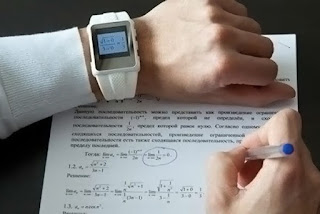
I showed an image of a Smart watch and then we looked at the news articles related to students cheating.
Click on image to see image source
Technology is certainly advancing and as the pressure mounts for students to achieve good results it is sad to think they feel the need to cheat.

I look back at when I was at university and there was an article in the media about students paying for essay notes and also for essays to be written on behalf of students. In my third year of university cell phone blocking technology had been brought in. The information on the internet was not as readily accessible and I remember Ask Jeeves was a popular site.

Check out these news stories from around the world

Smartwatch cheats force Thai students back to exam halls


Five more cases of exam cheating


A Cheating Crisis in America's Schools

Check out these spy glasses that are being marketed to be used in an exam. I really hope this 

MWE Glasses set includes the micro earpiece and the glasses with in-built transmitter and a microphone. Thanks to its tiny dimensions and wireless design Spy Earpiece is absolutely invisible for others. It can work about 7-8 hours without changing a battery. 

Want to know more visit http://www.gsm-earpiece.com/

On another note I found two articles that were promoting the opposite which reminded teachers, parents and students to report suspicions of cheating.

Report cheating, malpractice or exam fraud, Ofqual urges


In 2004 what...
were some significant events in 2004 click here and here
and what was the internet like in 2004 click here 


Wednesday, 18 May 2016

Mixing old skills with new

Today I wanted to show the children how to use Coggle.

I had to think about how I would share the link to 28 kids. I thought it would be great to make them sign on the long why to access our server. Why? I wanted the children to see how we had to log in the last few years. There are way to many steps just to access the web link and it was a good time to reflect on how we are changing access to storing files for their student accounts.


One good skill the children learnt was to copy and paste. After a few minutes we talked about having to copy all of the text and use Ctrl+c and Ctrl+v and discussed what a link or hyper link was. Our next skill was to look at instaGrok.

Unfortunately the site was down (or our access to the site) but I had shown them earlier how it could be used for our research work.


Last week they started using Google Drive so we talked about signing in and the differences of being only able to access the server at school as opposed to access 24/7 with their Google Accounts.

We discussed what to do next when websites don't work at school and some of the skills we used today.

Some of the skills we needed were;


  • Copy
  • Paste
  • Link
  • Problem Solve
  • and Collaborate


We finished the session using Scratch. It was a great way to check what we could remember from the first session.
Having learners from another class with us helped share knowledge. Some of them are regular Scratch learners so it was nice to hear them help others or be helped by others.
We used iPads, iMac, PCs, and Chrome books today to try and complete our tasks. The children worked out very quickly which device would suit which activity.
While we are learning it would be great to have the Chrome books full time but they are learning great problem solving skills using different devices.

Tuesday, 17 May 2016

Market $hare

Tonight we started the Mind Lab with a game called Market Share. After a brief discussion of the rules and then further clarification we played three rounds.

By the third round we had finally worked out 95% of the rules.

There were one or two rules that I'm not sure we understood but it was interesting to play the game with 2 other groups of two.

Being the third group to start made our job harder but we did have fun strategising about what businesses to buy.

We had to collaborate with each other to work out our interpretation of the rules. As adults we could negotiate but it would be interesting to see children try and use their reasoning skills to interpret the rules.

Saturday, 14 May 2016

Mindfullness

Last year a colleague gave my daughter a white mask to decorate. This morning we had a frantic hunt through the craft supplies for the mask. I had been sitting at the computer for about an hour doing my Mind Lab reading when my daughter walked in.
I was not expecting to see the mask completed as I assumed she was watching What Now. I immediately jumped up and celebrated her creativity. 
We have been looking at Mindfulness as a staff and it was a great time to stop and have a break and enjoy the world around me.

Wednesday, 11 May 2016

The frustrations of technology

Today we hoped to use the school COW and as usual it wasn't left to charge since the last time it was used. Interestingly it was plugged in to charge but not turned on at the wall.

Once I got the COW to my room I realised the computers weren't attached to their chargers so they wouldn't have charged anyway. There is some great learning opportunities which i take with my learners but I am beginning to wonder who else needs to be taught on COW etiquette.

The COW monitors do a great job and this week they have Cycle Safety so they are not in the classroom to check the COW but teachers that are using the COW are obviously not respecting the equipment.

At the next staff meeting I am going to take the opportunity to talk about the COW and I am also going to put a reminder in our daily notices to make an immediate change.

We have Chrome books in the school (which our seniors use 90% of the time) and I would love to use them more but it is also a good experience for the children to use a variety of technology. Making them aware of how to charge a computer, look at the battery percentage and then to be able to problem solve how to put it on to charge so it can still be used are all great skills. Unfortunately at the moment my learners think the computers are always charged and someone else will have them ready to go for them when they need it.


Fortunately we are beginning to change this mentality so they can adapt to solve technology issues as they arise.

On a positive note we managed to all sign into Gmail and Google Drive for the first time today. Which was a huge success.